
@pytest.mark 是 pytest 测试框架中的一个装饰器,用于给测试函数或测试类添加标记(marker)。
这些标记除了能对对测试进行分类、过滤外,还能给被装饰的函数一些额外的功能!

标记的分类

我们按照有无功能将 标记分为: 功能性标记 和 无功能性标记 两大类
类别特点主要用途是否影响测试逻辑
功能性标记会改变测试的执行方式参数化、跳过、预期失败✅ 直接影响
无功能性标记仅添加元数据/标签分类、筛选、分组❌ 不影响逻辑

无功能性标记

pytest 的所有内置 mark 都是功能性标记,没有内置的”纯粹无功能”标记,用户自定义标记即是无功能标记! 首先我们需要 pytest.ini 中注册自定义的mark,以避免警告,比如:
[pytest]
# 自定义mark
markers =
    p0: P0核心测试用例
    p1: P1重要功能测试用例
    performance: 性能测试用例
    api: 普通API接口测试

最后使用即可(给测试用例打打标记)
import pytest

@pytest.mark.p0
def test_one():
    assert 1==1

@pytest.mark.p0
def test_two():
    assert 1==1

@pytest.mark.p1
def test_three():
    assert 1==1
可以筛选出仅符合条件的用例去跑测试,比如
pytest -m p0
另外我们还可以根据标签生成测试结果分组统计,pytest 原生不完全支持这个功能,我们可以 pytest-html来解决, pip install pytest-html
# 生成HTML报告,会按标记分组
pytest --html=report.html --self-contained-html

功能性标记

如上所提,pytest内置了很多功能性mark供我们使用!
# 跳过功能
@pytest.mark.skip(reason="Bug #123 未修复")
def test_broken_feature():
    assert False  # 🚫 这个测试不会执行!

# 超时功能(需要插件)
@pytest.mark.timeout(5)  # 5秒超时
def test_slow_operation():
    time.sleep(10)  # 🕐 10秒后会超时失败
    assert True

# 参数化测试功能(这个单独讲,比较重要)
@pytest.mark.parametrize(...)
def test_addition():
    pass

参数化测试功能

参数化测试功能@pytest.mark.parametrize,是pytest内置的一个非常强大且重要的功能性标记!
参数化测试核心功能就是:让一个测试函数使用不同的参数运行多次!
arg_values=[] # 列表:参数值列表
# 使用方式如下: 第一个参数是字符串类型的参数名,用逗号分隔
@pytest.mark.parametrize( "arg_names",  arg_values)

单参数测试用例

import pytest

@pytest.mark.parametrize("number", [-1, 2, 3, 4, 5])
def test_is_positive(number):
    assert number > 0
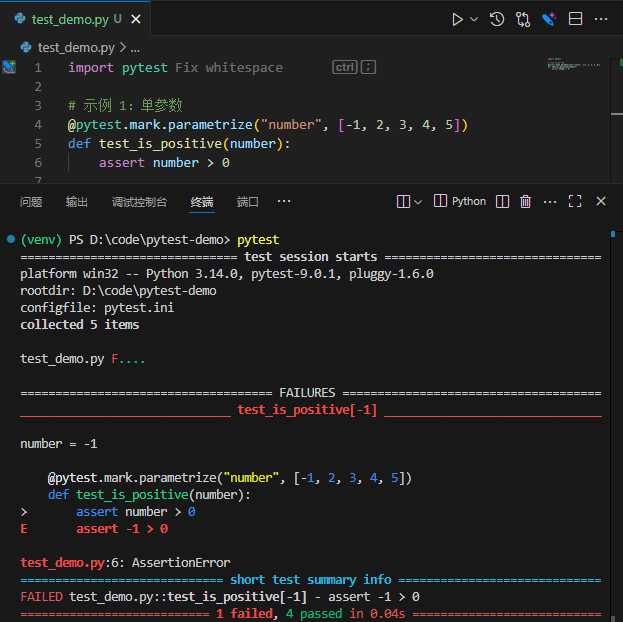
运行之后,可以看到测试用例test_is_positive跑了5次(1次失败+4次成功) 单个参数的值除了是基本类型,还可以是复杂点的类型,比如字典
import pytest

# 简单的字典参数,包含中文名字和年龄
@pytest.mark.parametrize("user_info", [
    {"name": "张三", "age": 25},
    {"name": "李四", "age": 30},
])
def test_chinese_user_info(user_info):
    print(f"用户: {user_info['name']}, 年龄: {user_info['age']}")
    
    # 验证数据存在
    assert "name" in user_info
    assert "age" in user_info
    
    # 验证中文名字(2-3个汉字)
    assert isinstance(user_info["name"], str)
    assert 2 <= len(user_info["name"]) <= 3
    assert all('\u4e00' <= char <= '\u9fff' for char in user_info["name"])  # 验证是中文
    
    # 验证年龄范围
    assert isinstance(user_info["age"], int)
    assert 18 <= user_info["age"] <= 60  # 合理的年龄范围

多参数测试用例

import pytest

params_value = [(1, 2),(3, 4),(5, 6)]
@pytest.mark.parametrize("x,y",params_value)
def test_coordinates(x, y):
    assert x < y

# 运行测试用例后,会发现该用例被执行3次,均为成功!

参数别名ids

其实还支持第三个参数@pytest.mark.parametrize(params_name,params_value, ids)
第三个参数是 ids为可选参数,用来给每组参数起一个可读的名字,也是列表类型,主要用于提高测试报告可读性。
import pytest

# 不使用 ids
@pytest.mark.parametrize("name,age", [
    ("张三", 25),
    ("李四", 30),
    ("王五", 35)
])
def test_without_ids(name, age):
    assert age > 20

# 使用 ids
@pytest.mark.parametrize(
    "name,age",
    [
        ("张三", 25),
        ("李四", 30),
        ("王五", 35)
    ],
    ids=[
        "年轻员工-张三",
        "中年员工-李四", 
        "资深员工-王五"
    ] # ids 数量必须和参数值匹配
)
def test_with_ids(name, age):
    assert age > 20
运行测试后的结果是
# 不使用 ids输出:
test_demo.py::test_without_ids[张三-25]
test_demo.py::test_without_ids[李四-30]  
test_demo.py::test_without_ids[王五-35]


# 使用 ids输出:
test_demo.py::test_with_ids[年轻员工-张三]
test_demo.py::test_with_ids[中年员工-李四]
test_demo.py::test_with_ids[资深员工-王五]